Monday, June 22, 2020

Synthesizer Top Picks 2020


1. Roland Boutique SE-02 Analog Synthesizer

The price, unique sound, and features send this Roland into the winners circle. Give your music some flavor and experiment with sequences and new sounds.

2. Sequential Prophet X

Spend some money on a power polyphonic. Whether sound design, playing for fun, or composing, this hits all the targets. Its high quality all the way. The X is going to be an instrument you keep for a lifetime. You won't run out of sound with massive audio possibilities on this keyboard.


3. MatrixBrute by Arturia

This one has a recognizable tone to it because of the filter. That gives it value. It will make some truly warped analog sounds. All the modifiers are going to be right in your face with the full Matrix of buttons. I want this synth.


4. Korg Arp Odyssey


This is a classic synthesizer in tone and layout. The sliders let you instantly see what is happening. A mono synth for retro sound and experimentation, ARP Odyssey would be an excellent performer.

There are lots of good choices today for new synths. If you have an older digital synth or just a computer, thats great. Everything is being streamlined into computers finally. To get really great musical results, rack gear, modules, and doing creative recording is still a necessary.

Links

I fixed some links in the pages to allow better navigation on resource pages and the store.

Well, there is a new Roland Fantom out. There's been lots of new products that I have not demoed or purchased. I'm upset at a few companies for mass producing junk for money without innovating.
I also don't think there has been lots of innovation in electronic music, but there are still artists making good music. I'm always hanging out in my spotify window looking for related artists.

I'm still interested in getting a MatrixBrute. Someday I'll look at synths I'm interested in using.

Tuesday, September 19, 2017

Store Still Operational, Still up.

Yes you can still buy sample packs & synth patches with Paypal. I answer emails and comments.

Update (December):  I am not using the .com domain. Let me know if you experience any issues.

Wednesday, April 5, 2017

Vaporware filter on the V-synth by Roland.


To get a really soft filter on the V-Synth, the Lo-fi filter can be used over COSM2. Do not use the bit crushing. Bitrate can be about 9 or ten or not used. Turn the filter close to all the way down. Balance to the right. Something about this filter is different than the -6db and 12db standard filters! You can get rid of all the aliasing and harshness. Now you can make synth sounds with COSM1 standard filters before the lo-fi.

For added touch, the radio master filter can have noise set to 1. tuning Zero.
The V-synth also has super long reverbs that also have filtering. Not to mention this has the space echo and chorus. Perfect Vaporware style!

I suppose you could run your entire mix through it if you were crazy. Or just run some samples around.

You never know what I'll discover on this keyboard....

Monday, March 6, 2017

The Arturia Matrixbrute Should Get Synth of the Year

I kind of want a Matrixbrute. It sounds amazing. It looks like an analog programmer's dream. Nothing really steps up to my V-synth....I don't need analog sound at that price, but I still want to play with it. Matrixbrute is a big expensive TOY.

I kind of like the TC electronics FX they put in the Behringer analog machine. The tone is a bit limited and same-y IMO and it doesn't do as much. I wouldn't recommend that just by looking at it and other reports. I don't think people should pay that much money. Not a value. You have to pay too much to get analog sound. BUT sometimes digital is better. Go digital if you want to save yourself. Its cheap, it has less noise, and it does more.

Thoughts from my brain.

Friday, August 19, 2016

Thanks for Sticking With Me in 2016

Its been a slow year. I have played keyboard quite a bit earlier in the year, but I'm not doing much now. No new posts or content planned yet, except to keep the site running.

Google drive has changed the way I host files, so I have to redo the download links soon :( Everything should be working. If things ever stop working here, you can always get a refund. I am still checking my email everyday for support.

Thank you for people that have supported my site over the years. Its been invaluable to me and made a direct impact on my day to day life, like using Paypal to buy cheeseburgers, etc. I'm going to keep the site up as long as I can. I plan to keep the site up forever.

If you want to support me, buy samples & reason packs with the store links on the right side ->

Tuesday, March 22, 2016

A quick guide to modeling some drums on the V-synth


Warning: This post is for V-synth and synth experts.

First set up your split point ZONES. You will end up with over an octave of drums. If you have a drum patch set up elsewhere you can borrow it. I won't tell you exactly how to do everything. You should use your ears and spectrum analyzer software. If your are new to V-synth, consult your manual. I will provide the core building blocks of doing realistic drums. Drums are highly dynamic. You should use the velocity curves and sharp envelopes whenever it makes sense.

General tips:
In general, "the snap" or attack of most drums is created by fast pitch decay.
Most drum sounds shouldn't be perfectly tuned and ring out. They won't sound real.
Most of the harmonic content will be noise.
Many drums should dampen reasonably over time with a LPF & Env (26-50)
Google the harmonics and mesaurements of drums to get close. Use your spectrum analyzer.
If you have any real life instruments to play with, or have samples to use as references, tuning will go a lot faster.
"Pitch KF" can screw with your zone tuning.
There are 500 memory slots. You can save different working versions and create many drum sets. Recompile your favorite sounds into the "Ultimate Drum Set."

The Bass Drum
  • Structure 1, A SQUARE WAVE + Sub osc (slightly lower volume).
  • -39 Pitch, Curve 2, Sens 48,  Env Depth 26, Decay 18, Sustain 0, LFO +12
  • LFO Fade 55, 116 rate, Sin
  • Pulsewidth LFO +42
  • Detune + 59
  • TVA Decay 85, Curve 2
  • COSM Lowpass filter
This uses the two square waves like membranes. The LFO creates the wobble of a big drum. The Envelopes give the snap and decay. I'm not sure there is much of a beater sound going on. You can always resample the oscs into one osc, then use the free one for a new element.

The Snare Drum

This one is a bit more difficult. We are using the feedback oscillator to create the ring of the shell. The noise is the snare. We run it through the lowpass filter to make it more like a sine wave. next we are using the Banjo resonator. The banjo has a shell and drum like membrane. That is perfect for tuning the rest of the drum head and more resonance.

Goals: What do we want to emulate? The membrane oscillation (feedback osc), snare noise (noise osc), Shell ring (resonator) and then it dampens (with the lowpass filter) because everything is so tight. We also want some "snap" in the pitch envelope. We can also randomize the pitch to emulate different stick hits in different locations on the drum head if you want. Here is what I tried:
  • Use Structure 1
  • Turn harmonics all the way up. Tune to your prefence
  • Modulate feedback amount with key velocity
  • Cosm 1 uses a longer decay lowpass filter, Env Depth +55, -6db, 109 Resonance. This muffles the sound.
  • Cosm 2 Banjo. Use a lower resonance and 50% balance. Tune to your prefence.
  • TVA, Fast attack < 10 and Decay about 40.
I am not going to give you the exact tuning for this one. Experimentation gave me a wide range of membrane tones and shell ringing. I have tuned mine to sound like my real life Yamaha Snare. I also have one with more ringing for rock. I have a third snare zone which is a clunkier sound, like a rimshot! It is all a study and experiment. I do not know what happens before I try it. I did use a lot of envelopes which are too numerous to list. I couldn't believe how cool it was.

Also...I was able to modify the above formula to make a woodblock tone. I switched to a triangle wave, and turned the resonator to guitar (wood), and turned its resonance very high. I also retuned everything. We are doing some real physical modeling now! Supernatural Drums, eat my dust!

The Cymbals

It is really difficult to make good cymbals. If you get anywhere close, you deserve a reward. You could save a lot of time by just using samples. This is what the TR-909 did. If you want to reduce aliasing, you could use a low pass filter on the sample (V-synth aliasing critics can shut their mouth now, haha!). What I tried:
  • Feedback oscillator
  • Noise oscillator
  • Frequency Shifter
  • HPF/LPF dual filter
  • FM Mod
  • Fast envelopes
Many people have given up. At least give it a try. It will still sound a bit electronic I think.

The Toms

You can make a really quick and dirty Tom by running the triangle wave through the Frequency Shifter COSM. Fast attack and some pitch env. Frequency shifter set low. Usual attention to fast envelopes and curve dynamic.

The FX
I use the Dynamic Compression (4:1 or 2:1) and Hall Reverb. I adjust the FX for each drum zone. Also set panning. Redo any velocity or amp envelopes. Listen to real drums and retune your zones.
If you want a really secret tip, I will sometimes run these drums through the Guitar Amp MFX and set the gain low, to model a tube amp. Green Day apparently used a tube preamp. With the gain up, you can hear all the frequencies combining to create more complex tones. You don't always want them to ring out in perfect tune. You could also try to match tunings and the overall characteristics of old break beats this way.

Good luck. You could come up with all kinds of drum sounds now.

Thanks to everyone who has supported my blog in the past. You really make a difference.

Saturday, January 30, 2016

New Synth Toys For 2016

Roland System 500 Complete set. I think this might be somewhat collectible or useable for a long time into the future. I do like the digital 1m module too however & their other eurorack modules look nice. As a toy collector I'd pick up all of these. The JD and mini modules I do not like for different reasons. They are cheap / small looking.

Yamaha's new Montage looks quite good. They added their FM engine back in.


The Matrix Brute....I think it might not sound that great, or something is funny. So many controls and its so cheap! What would I really do with it? I don't know. I'd need more audio demos to make a decision.

I like the Korg Minilogue. I think the sound does not seem too complex yet. However it looks like a nice build for a great price that blows out Arturia.

Where was Akai? Waldorf is kinda meh too. Neither company has a flagship.

So it is 2016?
What is the ultimate synthesizer? What should you really buy to make music?

1. Jupiter-80 (find me a more powerful synthesizer with effects & layering! you can't!)
2. Korg Kronos
3. Korg Odyssey
4. Yamaha Montage
5. Dave Smith Prophet 12 or Pro 2

What else would you need to make music? Maybe just sound banks on your computer, or a drum machine. This would be my recs for buying something new off the shelf. Happy 2016. Push the envelope of technology and make new music for me. Do not settle for retro music or nostalgia.

Tuesday, October 6, 2015

Roland Boutique, Moog Mother, and More Updates.

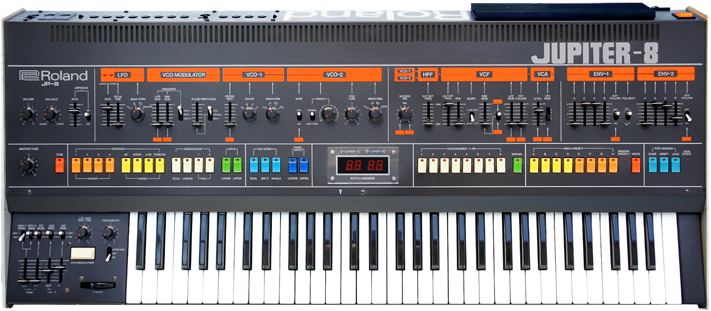
So what is going on with the new Roland boutique line? It looks awesome, but of course when you get into the details its another product I do not need. I just hope this tech comes to a mega-synth module that's overpowered with all the options. The boutique systems are only 4 polyphony. Therefore, I can't use it as a Jupiter 8 clone. Minikeys also invaded to keep the cost down. My fingers are too big. I could use it as a module, or buy two of them, but geez thats too many hookups and doubles the cost for a digital system. They are kind of cool and sound better than whats out there now, but I'd end up spending as much as my computer for a Jupiter-8. I'd just end up fooling around with it.


Roland's Boutique line is Kinda Cool, but a pass just from the specs alone. Roland came out with other synths this year but I don't care about those either!

Moog's Mother 32 is a Euro rack system that sounds good so far and is not expensive. I think a lot of people will be picking this up. It seems to nudge a lot of budget options out of consideration if you are into modular.

What else? I've been playing synthesizer at home. I renewed this domain for another year and plan to keep it going as long as I can. I'm still happy with the switch to Blogger platform. I might create a seperate video gaming blog and review games, because that is also a hobby.

Tuesday, June 9, 2015

Synthesizing Cymbals (909 High-hats) on the V-synth


It is quite hard to get a good cymbal sound by subtractive synthesis alone. A lot of tutorials will use mainly a noise oscillator and a triangle, but you can go a little bit farther. This will not be a full tutorial, but I will give some nice hints. This setup makes a slightly 909-ish high hat sound.

This is my chain for high hats.

Juno OSC with octave oscillator up + Noise OSC -> FM Modulation -> Comb Filter -> Resonator, Resonator Guitar model.

Explanation:

The Juno Osc seems to make a nice cymbal sound. It is sort of like triangle but has extra waves. With the extra oscillator engaged you can tune it a little. Turn the pitch up very high. Next, the Noise Osc can actually be tuned slightly with the PWM control. The FM modulation enaged seems to make more sharp noise. You can try it on or off. The comb filter, tuned up seems to channel the energy, and you can adjust the tone. Lastly, the metallic guitar resonator  gives it all that 909 sample cymbal sound if you balance it right and tune it up high. (I also found the resonator works better than the frequency shifter for snare drums and toms, but thats a different tutorial).

You will have to find the right tunings and timings yourself. I'm not going to go into the envelope settings because they are either long or short for open or closed high hat. You can also change parameters dynamically with velocity. Copying the sound into zones allows you to make the open & closed sound. Remember to make the pitch scale flat of the oscillators so the sound doesn't change.

Good luck. If you have a better formulation, leave it below.

Tuesday, March 31, 2015

How to get PCSX2 working with Wineskin on Yosemite


The mac is not the best system to run the latest batch of emulators. I can promise to get the emulator program working, but not every game. Its still better to buy an actual PS2 and the actual game, but this is a start up tutorial to help you get tinkering. Below is some text instructions that will help.
 Requirements:
Install:
  1. Open Wineskin Winery. Create a wrapper. Name your app PCSX2. View wrapper in finder.
  2. Open the app's package by right-clicking "show package contents" Double click Wineskin.
  3. Install PCSX2 software. Choose setup executable (the PCX2 exe installer). Quit.
  4. Back out of the folders. Double click the actual application PCSX2.
  5. PCSX2 settings. GS: ZeroGS. SPU2: Configure. Select PortAudio.
  6. Put your PS2 Bios files inside the Bios folder in the OSX user document's folder! Overall its pretty annoying finding the right directories, and I'm not going to go into it further. I left it default because the program crashes and gets confused sometimes.
  7. Select the bios and hit Finish! The PCSX2 is running. You can run your ISO rom files with fast boot.
  8. Recheck your graphics and audio settings, like the PortAudio, and make sure its configured to the default audio device.
Overall I got some games to boot up, but there were slow downs. I'm not promising you can play the games. I was able to get a bit into Monster Rancher 4. I couldn't get Ridge Racer 5 to run right. If you have extra tips on settings please post them. I will not answer any questions or provide other links. This was the best method I found to get the application to work sadly. Hopefully the programmers make a real mac version that runs games. The state of PS2 emulation is pretty poor compared to Genesis and SNES.

Wednesday, February 11, 2015

Anouncing V-synth Ultimate Pack 2


New for 2015, this is the second V-synth Patch Bank with 300+ more presets from our website. If you are a previous customer of the first V-synth bank, you'll want to purchase this Ultimate Pack 2! You can have a preview of it's synthesizer category here: https://soundcloud.com/stealthgear/vsynth-ultimate-pack-2-synths. This is a serious fill-up!

It features more great sounds, piano, guitar, FX, dubstep sounds, the best basses, ambient pads, and 70s & 80s synths. Its $99 and is the culmination of a year's work of making presets. These are specifically developed for this website and are not copies. More useable and more mixable than ever before.

Thursday, January 29, 2015

ProTip: Interesting Harmonic Distortion on the V-synth

If you want to emulate another piece of gear's harmonics, you can attempt to do so with the V-synth. With an FFT program, (I recommend SigScope) you can determine the harmonics of the amplifier distortion MFX on the V-synth.

1. Select a sine wave.
2. Play the note that closely relates to a FFT graph you are emulating. (In my case a 1k sine wave)
3. Use the Guitar Amp Master Fx and scroll through different settings to see the output.
4. Find someone else's FFT test graph for whatever piece of gear you are emulating.
5. Adjust the Gain & EQ to match the graphs. The harmonics are the lines after the first large spike. The spacing and height of each determines the change. You can just guess or do the best you can. You might not be able to match it at all, or you might find a new sound you like.

With the V-synth you must use really low gain both on the OSC and the MFC volume. If you hear the sinewave overdriving, you are a little too loud.

I was able to match Neve 1073 channel strip with two Marshall amplifiers, one in the COSM, and one in the MFX. Both had low gain. I used a LPF on the first COSM slot to have a bit of roll-off. You can also introduce noise into the mix on the second OSC.

Basically, it is "british EQ" on the V-synth!Does it sound the same?  I'm not sure I even care, I'm just exploring the sound pallette everyday with this keyboard. I'm sure I've done things the designers hadn't thought of.

So what can you do with all this? You could run audio through the input, or use the LPF for different synth sounds. SigScope pro can also check the waveform shapes if you want to explore more. If you have this set up, you will probably run out of slots for creating synth sounds, so maybe use a sample. If you have a JP-80 you could probably go wild, as it has more FX combinations. If you are going old-school, you could probably use a plate reverb.

So thats my tip for getting slightly different distortion textures! No matter what you do, you can never get things perfect, but its fun to try and explore the endless possibilities.

Monday, January 26, 2015

Roland Promars Plug Out

I think this one sounds a lot better than the System 1 original! Roland is going to be king of digital synthesis again.

Thursday, January 22, 2015

Namm 2015 Roundup: Roland JD Xi, JD XA, Dave Smith Prophet 6

Roland JD Xi

This one looks pretty good, except for the small keys (you can play triplets, but still my hands are too big for it). Its pretty much an analog / digital, all-in-one, groove keyboard. I haven't seen a demo from the digital side except that it has supersaw. I really hope these voice well and combine the oscillators in a patch. But whats even better is the Roland JD-XA!

If you are into keyboards, this is obviously the one you will want to wait for.

What else?

DAVE SMITH PROPHET 6!


It sounds great again and is packed with features! It looks like a revisit to the Prophet 5.  Its really good looking! Listen to it here on soundcloud. I like it when these companies are fully ready to show everything off.

Where is Yamaha? I don't know yet...

So far I think these are the best products to post up. Korg has some nice new replicas, and there are some other analog monophonics, but those are not things I'm into...the tech is just too old! I need patch memory.

Wednesday, January 14, 2015

Akai Pro Advance 25,49,61 Keyboard Midi Controllers come with software.

New Midi controllers from Akai. They have a built in screen of some type and come with some software instruments. They do look pretty cool if you work inside the computer. I'm really afraid of midi controllers. The ones promising to be ultra integrated have been the hardest to set up. Time will tell.


From NAMM 2015 AKAI PRO link

Wednesday, January 7, 2015

Jupiter 8 sounds on the V-synth

Lets synthesize the Jupiter 8 sound!

The trick to making a Jupiter 8 on the V-synth is different from other analog types. Its quite easy to make a Moog lead (or analog pad) on the V-synth by just using the TB-303 filter. I don't have a JP-8 in front of me, but the pitch seems to be quite stable.

Settings:
Use a small randomization and drift factor for pitch.
 -2, RND PITCH LFO, -2 Randomization in the pitch section.
 The above setting will make it go out of tune by only 4 cents!  Other analog instruments use more.

The PWM can be drifted by -30! If you use a basic wave, like triangle or SIN, you will start to get the right shape, but don't go too bright. You can also adjust the attack and envelope if you want.

Next use a regular -12db filter, with really moderate settings! I thought the filter would need special programming beyond the what V-synth does, but thats not the case. However, the resonance is quite impossible to nail down perfectly. The attack and decay depend on the sound you are making. I actually think less than 5 attack is not necessary.


Amplification is the final part.

Use the Guitar amp MFX, JC-120 amp. Does this amp have the same circuitry as the JP8? I don't know, but maybe it was used on a lot of records and it gets the tone right. Turn the gain to LOW. Set the input to 43 or so. Turn off the speaker. Set the EQ Bass and Mid to 110, treble turned down a bit. Brightness off. You might have to nudge things around to get the proper brightness. This amp kind of makes the treble sing and thats why we use it.

This isn't a complete tutorial to a specific sound, but now you have the basics. There are not a lot of options to get a modeled analog sound on this keyboard, but there are tons of workarounds and secrets!

Friday, January 2, 2015

Using Feedback in Sound Design

One way to make a sound more alive is by using feedback loops at different stages. In a synthesizer or FX chain a loop will shape sound with a repeated frequency. The sound is referencing its own signal from another part of the system. Ultimately the sound will hit a maximum resonant frequency or amplitude. If the system is well designed, it won't blow your speakers! If its digital, the worst that can happen is clipping. You can adjust levels to create the most interesting effect without going overboard. There are ways to control the sound so its not just a constant overload which I also mention below.
  1. Feedback Knobs - This is found on chorus, phasers, delay etc.
  2. Dynamic Envelopes - Like a compressor, or dynamic filter, these reference the amplitude of the input to make the sound come alive. Found on V-synth, lots of software FX filters.
  3. Feedback Oscillator or Loop chain built into a synth - This is found on Dave Smith's designs and also V-synth. This can create circuit overload and clipping sounds.
  4. Reverb - Reverbs are a type of feedback. The sound is repeated back to you and affected by time / resonance.
Step Two: How to control and shape the feedback.

Try amplitude modulation or randomization before the inputs. The goal is to find some kind of balance and interesting use of the feedback. The end result is a new sound with some cool time effects. All of the modulation and self referencing will make the sound come alive.


WARNING, this is what happens when you feedback a Roland supersaw wave.

Roland JD-Xi Leaks

It looks like it has mini keys and a small mod wheel. It likely has a step sequencer with the bottom pads. I'd imagine the quality is similar to the midi keyboards, which is acceptable, but not amazing key action. Hopefully this has on-board sounds. I'd imagine this connects to downloadable AIRA / presets. The fact they are using the JD letters probably means it is synth + some of the original roland waves, but not Supernatural. Thats my best guess. I'm also going to guess this costs $599 or less.